Triathlon Bike Computer Setup: Screens, Sensors and a Backup Plan
Set readable triathlon screens, verify sensors and rehearse navigation, battery management and a blank-screen backup.
By Lotte
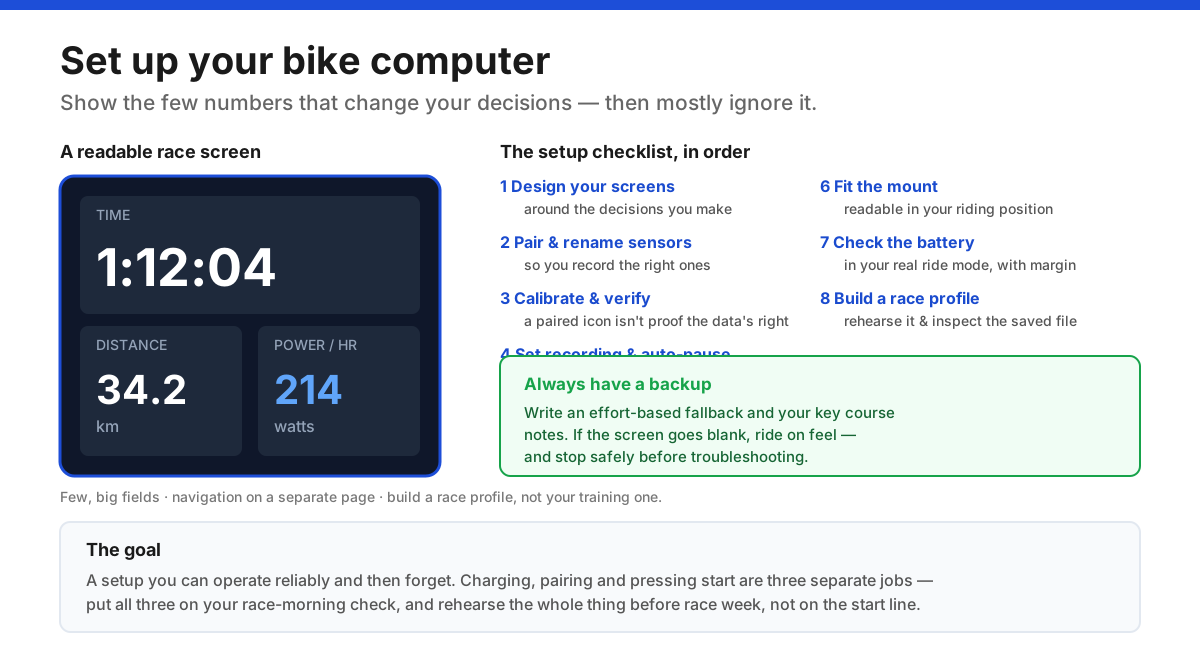
A triathlon bike-computer setup should show the few values that change your decisions, record the correct sensors accurately, stay readable in your race position, and have an effort-based backup for when it fails. Design your race screens, pair and calibrate your sensors, choose recording and navigation settings deliberately, mount and battery-check it, then build and rehearse a dedicated race profile before race week.
Key takeaways
- 1Design race screens around the few decisions you make — time, distance and current effort — in large, glanceable fields, with navigation on its own page.
- 2Pair and rename your sensors so you record your own devices, then calibrate and sanity-check the numbers — a paired icon doesn't prove the data is right.
- 3Set recording and auto-pause deliberately: the race clock keeps running, so know which fields use elapsed versus moving time.
- 4Mount it where you can read it in your riding position, and estimate battery life in your real race mode — then charge the night before.
- 5Build and rehearse a dedicated race profile before race week, and always keep an effort-based backup for a blank screen.
In this article
- 1Before you set up: what a race screen is for
- 2Design your data screens
- 3Pair your sensors — and record the right ones
- 4Calibrate and verify the numbers are plausible
- 5Set recording and auto-pause behaviour deliberately
- 6Load navigation and set only useful alerts
- 7Mount it and check readability in your riding position
- 8Plan the battery for your race
- 9Build a race profile and rehearse it
- 10Always have a blank-screen backup
- 11The bottom line
- ⚖The bike-computer setup checklist
- ?Frequently asked questions
Before you set up: what a race screen is for
A bike computer is only useful if it shows you the few numbers that actually change what you do on the bike — and hides the rest. The most common setup mistake is cramming a screen with a dozen tiny fields, which turns a glance into a stare and a helpful tool into a distraction.
So the whole setup starts with a question: what decisions do I make while riding? For most triathletes that's pacing (am I riding within myself so I can run?), timing and distance (where am I in the race?), and sometimes navigation. Everything on your screens should serve one of those; anything that doesn't is clutter.
This guide assumes you already own a computer and want to set it up well. If you're still deciding whether you need one at all — and which type — start with the bike computer buying guide. And for what to actually do with the numbers once you're recording them, see data-driven triathlon training. Here we're on the practical middle ground: turning the device into a reliable race tool.
Design your data screens
Build your screens around those decisions, with a strong bias toward few, large fields you can read in a fraction of a second.
A sensible primary race screen might show:
- Elapsed time and distance — where you are in the race.
- Current effort — power if you have a meter (often a smoothed 3-second field, plus a lap-average to pace by), or heart rate if you don't. Keep perceived effort in the mix regardless.
That's often enough. A second page can hold a couple of extra fields (lap details, gradient, time of day), and navigation belongs on its own page so a map doesn't shrink every number to nothing.
This is an illustrative layout, not a prescription — the right one reflects the decisions you make, not every field the computer offers. Crucially, build a dedicated race profile separate from your training screens, so race day shows exactly what you rehearsed. If you pace by power, the underlying number is explained in cycling watts explained and FTP explained.
Pair your sensors — and record the right ones
Next, connect your sensors, and do it carefully enough that you're recording your data and not a neighbour's:
- Wake each sensor (a power meter, heart-rate strap, speed/cadence sensor) and pair it within the intended activity profile, following the device manual.
- Rename sensors where the computer allows it, so your own power meter or strap is unmistakable among the dozen other devices broadcasting in a transition area.
- Know which source records if you have more than one. If you own both an on-bike power meter and a smart trainer, be clear which the profile uses, and avoid accidentally swapping sources between training and racing.
Most modern sensors use ANT+ and/or Bluetooth; the heart-rate chest strap guide and power meters guide cover the connectivity side. A green "paired" icon means the link is made — it does not prove the numbers are right, which is the next step.
Calibrate and verify the numbers are plausible
A paired sensor can still report nonsense, so verify before you trust it:
- Follow the calibration procedure in the manual — typically a zero-offset ("calibrate") for a power meter, done to the maker's instructions and when the device has settled to temperature.
- Check the settings the data depend on: crank length for a power meter where relevant, wheel size for a wheel-speed sensor, and your units (watts, km or miles, etc.).
- Ride briefly and sanity-check. Do the numbers move as expected — power rising when you push, heart rate climbing over a minute, speed matching reality? An implausibly flat or spiking value points to a calibration, contact or pairing problem, not a fitness insight.
Doing this once, properly, is what separates data you can pace by from data that quietly misleads you. Re-check calibration periodically and after anything that could disturb it (a battery change, a big temperature swing).
Set recording and auto-pause behaviour deliberately
A few recording settings quietly change what your numbers mean, so choose them on purpose:
- Auto-pause. It removes stopped time from your activity, which can be handy in training but misleading in a race, where the official clock keeps running through every stop. Know which of your fields use elapsed versus moving time, and never plan cut-offs from a moving-time average.
- Power averaging. Some devices include zero (coasting) values in an average and some exclude them, which can noticeably change a displayed average. Pick one, record your choice, and keep it consistent so your sessions compare fairly.
- Manual laps. Marking laps at course segments or effort blocks is useful — but practise the button so you don't accidentally stop or discard the activity when you meant to lap.
None of this is complicated, but discovering it mid-race is exactly the kind of avoidable confusion a good setup removes.
Mount it and check readability in your riding position
A computer you can't read — or that rattles loose — is worse than none:
- Fit the mount to the manufacturer's instructions and confirm the unit locks in securely; use an approved tether if one's available. Check clearance from bottles, cables, your knees and forearms, especially in the aero position.
- Read the screen from your actual riding position, in daylight, wearing your race glasses. Size the fields and set the brightness so a quick glance is enough. Tinted lenses and low sun change readability more than people expect.
- Test the controls the way you'll use them. Buttons and touchscreens behave differently with sweat, rain and gloves — know before race day whether you can change a page or mark a lap reliably.
The screen has to work at the exact moment, and in the exact position, you'll need it — so test it there, not on your desk.
Plan the battery for your race
Battery anxiety on a long ride is entirely avoidable with one honest check. Estimate battery life in the mode you'll actually race in — GPS accuracy setting, screen brightness, navigation on or off, and your sensors connected all draw power, and the headline figure on the box assumes none of the demanding ones.
For a sprint or Olympic bike leg, almost any modern computer has ample charge. For long-course racing, do the maths against your longest expected time with margin, and if it's marginal, adjust the settings (dimmer screen, lower-power GPS mode) or plan a top-up.
Then make charging part of your routine: charge the night before every event. Remember that charging, pairing and pressing start are three separate jobs — a fully charged computer you forgot to start records nothing.
Build a race profile and rehearse it
Pull it together into a dedicated race profile and rehearse the whole thing before race week — never trust a first attempt to the start line:
- Build the profile with your race screens, sensors and settings.
- Do a short rehearsal ride that includes starting the activity, marking a lap, changing a page, navigating a turn if relevant, and saving at the end.
- Inspect the saved file afterward: did it record the sensors you intended, for the full duration, with the settings you chose?
This dry run catches the small stuff — a sensor that didn't connect, an auto-pause you didn't want, a field you can't read — while there's still time to fix it. Make adjustments while stopped, never while riding, and keep the device and its cables clear of your steering and access to food and brakes. Fold the device checks into your race-morning routine so it doesn't eat your whole transition buffer.
Always have a blank-screen backup
Electronics fail, batteries die and sensors drop out — so never let your race depend entirely on the computer. Before the start, prepare a simple fallback:
- An effort-based plan. Know how the bike leg should feel — the perceived effort that keeps you within yourself for the run — so you can ride well by feel alone if the screen goes dark. This is really just good pacing strategy you'd want anyway.
- Your key course notes. The handful of things you'd need without navigation — the total distance, any critical turns or the lap count.
If a sensor fails mid-race, resist the urge to fix it while riding — dropping into menus at speed is how crashes happen. Stop safely if you genuinely need to troubleshoot, or simply ride on feel to the finish. A computer should make your race easier; it should never be a single point of failure that can end it.
The bottom line
A good bike-computer setup is one you can operate reliably and then mostly forget. Show the few numbers that change your decisions on a readable race screen, pair and calibrate your sensors so the data is trustworthy, choose your recording and navigation settings deliberately, mount it where you can glance at it, plan the battery for your real ride mode, and rehearse a dedicated race profile before race week — with an effort-based backup ready in case the screen goes blank.
Do that and the device fades into the background, leaving you to focus on riding well and setting up your run.
From here: the bike computer buying guide if you're choosing a device, data-driven training for using the numbers, cycling watts and FTP explained for pacing by power, and the race-morning routine for fitting it all into race day.
The bike-computer setup checklist
| Step | What to do | How to verify |
|---|---|---|
| Screens | Show a few large, decision-driving fields | Read them in a glance from your riding position |
| Sensors | Pair and rename power, HR, speed/cadence | Confirm you're recording your own devices |
| Calibrate | Zero-offset; set crank/wheel/units | Numbers move plausibly on a short ride |
| Recording | Decide auto-pause and averaging | Know which fields use elapsed vs moving time |
| Navigation & alerts | Load the route; keep alerts minimal | Works offline; alarms prompt real actions |
| Mount & battery | Secure mount; estimate battery in race mode | Locks in; charge covers your longest ride |
| Race profile | Rehearse start, lap, page, save | Inspect the saved file for the right data |
Sources
Sources are listed so readers can verify consequential claims and dated details.
- Edge 540 owner's manual: profiles, sensors and recording — Garmin (accessed September 20, 2026)
Frequently asked questions
How should I set up my bike computer screens for a triathlon?
Show only the few fields that change your decisions — typically elapsed time, distance, and current effort (power if you have a meter, otherwise heart rate) — in large, glanceable text, with navigation on a separate page. Build a dedicated race profile rather than racing on your training screens, and keep perceived effort in the mix as a sanity check.
Should I use auto-pause in a triathlon?
Be careful — the official race clock keeps running through every stop, so auto-pause can make your displayed moving-time average misleading for pacing and cut-off planning. Understand which of your fields use elapsed versus moving time, test the setting in advance, and always plan deadlines from the official event timing rather than your training file.
Do I need to calibrate my sensors, and how?
Yes — a paired sensor isn't necessarily an accurate one. Follow the manual's calibration procedure (usually a zero-offset for a power meter once it's settled to temperature), set the values the data depend on such as crank length and wheel size, then ride briefly and check the numbers move plausibly. Re-check after a battery change or a big temperature swing.
Why is my power or heart rate reading wrong?
Almost always a setup or contact issue, not your fitness. Check calibration, that the correct sensor is paired (not a neighbour's), crank length or wheel size settings, and battery and strap contact. Spikes, drop-outs or an implausibly flat line point to the measurement — verify the sensor before you re-plan your training around a surprising number.
How much battery do I need for a race?
Enough to outlast your longest ride in the mode you'll actually use — GPS accuracy, screen brightness, navigation and connected sensors all drain it faster than the headline figure. Sprint and Olympic distances are easy for any modern unit; for long course, check the estimate against your longest expected time with margin, and charge the night before.
What happens if my bike computer fails mid-race?
Have a backup ready: know how the bike leg should feel so you can pace by perceived effort, and note your key course details (distance, turns, laps). If a sensor fails, don't dig into menus while riding — stop safely to troubleshoot or simply ride on feel to the finish. Never let the computer be a single point of failure.