Bike Computers for Triathlon: Do You Need One and How to Choose
Do you need a bike computer for triathlon? Compare a computer, watch and phone by readability, navigation, sensors, battery life and cost.
By Lotte
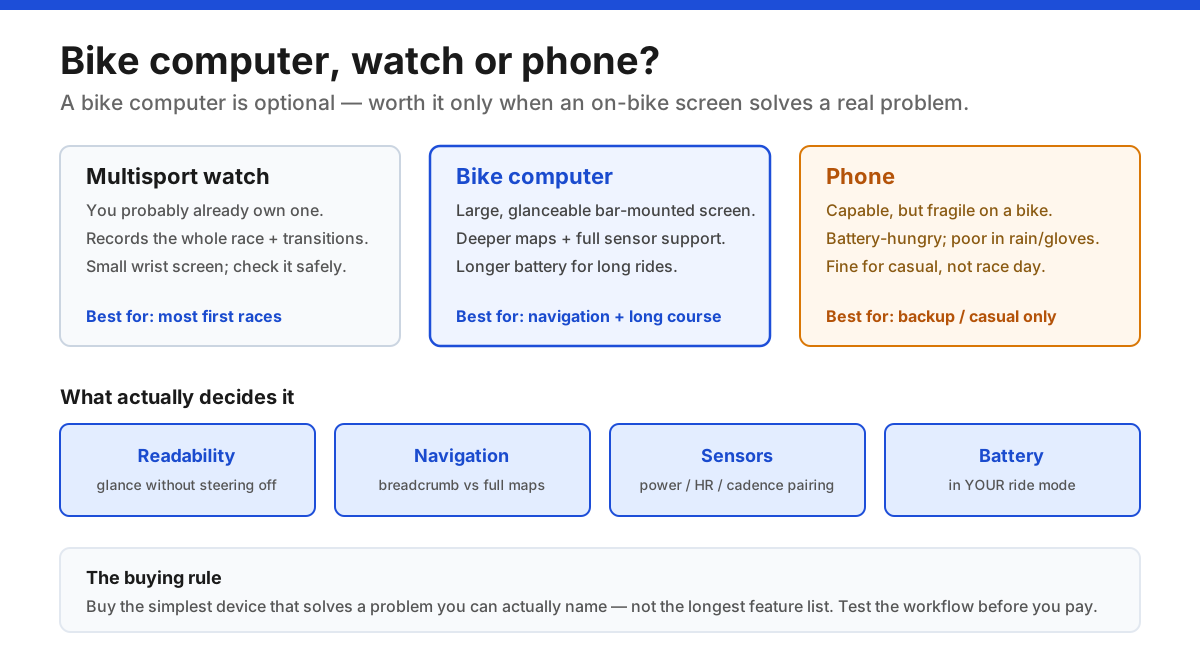
A bike computer is optional for triathlon: it's a bar-mounted GPS that records, displays, navigates and connects sensors — all things your multisport watch already does, just with a bigger screen and deeper cycling features. It earns its place mainly for long-course racing, unfamiliar routes and training by power. Choose from a problem you can name, then compare readability, navigation depth, sensor compatibility, real battery life and cost, and buy the simplest unit that meets those needs.
Key takeaways
- 1A bike computer is a bar-mounted GPS that records, displays live data, navigates and pairs sensors — optional, because your watch does the same with a smaller screen.
- 2Start from a problem you can name (readability, navigation, sensors, battery), never from the feature list; a first sprint or Olympic usually needs only the watch you already own.
- 3Verify sensor compatibility (ANT+/Bluetooth) and features against the exact model — product-page claims can depend on firmware, accessories or a subscription.
- 4Judge battery life in your real ride mode (navigation and sensors on), and rehearse a long ride before relying on it; never compare advertised maximums.
- 5Buy the simplest device that meets your verified needs, budget for the mount and any subscriptions, and hand off setup to the setup guide once you've chosen.
In this article
- 1What a bike computer actually is
- 2Do you actually need one? Watch vs computer vs phone
- 3Match features to real sessions
- 4Readability and mounting: the real everyday advantage
- 5Navigation: decide how much you really need
- 6Sensors and compatibility
- 7Battery: read it in your ride mode
- 8Connectivity, apps and ecosystem
- 9How a bike computer fits triathlon specifically
- 10Total cost, buying used, and not over-buying
- 11The bottom line
- ⚖Bike computer vs multisport watch vs phone
- ?Frequently asked questions
What a bike computer actually is
A bike computer — sometimes called a head unit — is a small GPS device that mounts on your handlebars and does four jobs at once: it records your ride (route, speed, distance, time), displays live data on a big glanceable screen, navigates with maps or a route line, and connects to sensors like a power meter or heart-rate strap. Afterwards it syncs the file to an app and training platform.
Everything on that list your multisport watch can also do — the difference is the screen on the bars and how deep the cycling features go. So the honest framing for a triathlete isn't "which bike computer is best," it's "do I need one on top of the watch I'll already be wearing?"
For a lot of athletes, especially at shorter distances on familiar or marshalled courses, the answer is no. This guide walks through when a computer genuinely earns its place, and how to choose one without paying for a feature list you'll never use. For the training side of what to do with the numbers, see data-driven triathlon training.
Do you actually need one? Watch vs computer vs phone
You'll record and see your ride with one of three devices, and each has a clear sweet spot:
- The multisport watch you already own. It records the whole race — swim, bike, run and transitions — in one file, which a bike computer can't. Its limit is the small wrist screen: reading it means taking a hand toward the bars or glancing down, which some riders do comfortably and others don't.
- A dedicated bike computer. Its advantages are a large, configurable screen you can read without moving, deeper navigation, fuller sensor support and longer battery for very long rides. Its cost is money, another device to charge and manage, and duplicated recording if you also wear a watch.
- A phone. Technically capable with the right app, but fragile on a bike, battery-hungry, and poor in rain or with gloves. Fine for casual riding, not something to rely on for race day.
The deciding question is simple: what can't you do comfortably right now? If glancing at your wrist disrupts your steering or aero position, or you're getting lost on unfamiliar routes, a computer solves a real problem. If you ride by feel and just want the file afterwards, your watch is enough. Start from the problem, never from the spec sheet.
Match features to real sessions
The fastest way to cut through marketing is to tie every "must-have" feature to a session you actually do and a test you can run:
| Need | Feature to verify | A practical test |
|---|---|---|
| Read effort at a glance | Large, configurable data fields | View it from your riding position |
| Follow unfamiliar routes | Maps or course guidance you'll use | Load a route and miss a turn safely |
| Record a power meter | Exact sensor compatibility | Pair your sensor and inspect the file |
| Finish a long ride | Battery in your ride mode | Rehearse with navigation + sensors on |
| Use in rain or with gloves | Usable buttons or touchscreen | Practise start, lap and stop |
The key trap: a feature printed on a product page may depend on a firmware version, a paid accessory or a live phone connection. "Has maps" and "has the maps you need, offline, without a subscription" are different claims. Always verify the implementation for the exact model you're considering, not the family name.
Readability and mounting: the real everyday advantage
If a bike computer earns its keep for most triathletes, it's here. A screen mounted out in front of the bars, sized so you can read two or three big numbers without turning your head, keeps your eyes up and your line steady — which matters most in exactly the situations that make people nervous: aero position, race pace, and traffic.
A few practical points that a spec sheet won't tell you:
- Out-front mounts put the screen in your natural sightline and clear space on the bars. Check the mount matches your bar shape and your aero setup.
- Screen size isn't automatically better. A bigger unit that forces an awkward mount, blocks a bottle, or sits where you can't glance at it is worse than a smaller one placed well.
- Controls in the real world. Buttons work with cold hands and in rain; touchscreens can misbehave when wet. Make sure you can start, lap and stop without looking.
Set up only the two or three fields you'll actually use per screen. A cluttered display encourages constant checking of numbers that don't change your pacing — the opposite of what the device is for.
Sensors and compatibility
A big reason to add a bike computer is to bring your sensors together on one screen — but compatibility is where careful buyers save themselves grief.
- Protocols matter. Most modern sensors talk ANT+ and/or Bluetooth (BLE). Confirm the exact device pairs with the exact sensors you own — a power meter, heart-rate strap, speed/cadence sensor, and increasingly radar or smart lights.
- Power is the headline sensor. If pacing by power is your goal, verify the computer records your power meter cleanly and check what it can display (3-second power, normalised power, etc.). The physiology and how to use those numbers lives in power meters for triathlon and cycling watts explained; cadence is another common field.
- Don't double-record blindly. If you wear a watch and run a computer, decide which device owns which sensor so you're not fighting for the same connection or ending up with two conflicting files.
Where possible, pair your actual sensor before you commit and inspect the saved file. A sensor "supported" in general can still behave differently with a specific firmware version.
Battery: read it in your ride mode
Advertised battery figures are best-case numbers, and they collapse under the settings that make the device useful. Full-time navigation, high-accuracy GPS (including multi-band), several paired sensors, screen brightness and notifications all draw power at once.
The number that matters is battery life in the mode you'll actually ride — navigation on, your sensors connected, the brightness you need to read it. For a long-course athlete, the question is blunt: will it comfortably outlast your longest ride and your longest race, with margin? For a sprint or Olympic athlete, almost any modern unit is fine.
Two habits protect you: never compare two devices' maximum battery claims (they're measured in different modes), and rehearse a long ride with everything switched on the way it'll be on race day. Battery anxiety on a five-hour bike leg is entirely avoidable with one honest test ride.
Connectivity, apps and ecosystem
A head unit isn't a standalone gadget — it lives inside an ecosystem, and that shapes daily use more than most people expect.
Check how rides sync (automatically over the phone, over Wi-Fi, or via cable), whether you need a manufacturer account, and how well it pushes to the platforms you use — Strava, TrainingPeaks or your coach's system. If you build structured workouts elsewhere, confirm they load onto the device cleanly.
Be honest about lock-in too. Sticking within one brand's ecosystem (watch, computer, sensors, app) usually gives the smoothest experience, but it also makes switching later more expensive. That's a fine trade to make deliberately — just make it with your eyes open rather than discovering it after you've bought three accessories.
Count the steps: a device that needs a phone and an internet connection to do simple things is a device that will occasionally fail you at the worst moment.
How a bike computer fits triathlon specifically
Triathlon puts two distinct demands on a head unit, and they pull in slightly different directions:
On race day, the value is a clear pacing display you can read in the aero position without breaking form — especially on an Olympic or long-course bike where going out too hard wrecks the run. Remember most age-group racing is non-drafting, so you're pacing your own effort, and the pacing strategy you rehearsed matters more than any live number. Keep the screen minimal: the two or three fields that actually change your decisions.
In training, a computer comes into its own for structured work — following a workout, holding a power target, and reviewing files afterwards. That's where it connects to the wider bike-training picture and data-driven training: the device captures the data, but your training design decides whether it's useful.
For either use, once you own one, the bike computer setup guide covers building your screens, pairing sensors and recording — the practical step this decision leads into.
Total cost, buying used, and not over-buying
The sticker price is rarely the real price. Budget for the mount (and any adapter for your bars), a case or screen protector if you want one, and any maps or subscriptions you'll actually rely on. A cheap unit whose battery can't cover your longest ride, or whose maps need a paid tier, isn't the bargain it looks like.
Buying used can be excellent value if you check the essentials: the mount interface and buttons, the screen, the charging port, honest battery condition, which sensors it supports, and whether it can be fully reset to your account. Confirm the model still gets the software support you need. Include any replacement accessories in the price you compare.
And resist buying up the range "to be safe." The right choice is the least complicated device that meets the requirements you verified — the readability, navigation and sensor needs you named at the start. A manufacturer's manual is a better compatibility check than any "best for everyone" ranking, and features you never switch on are just cost and clutter.
The bottom line
A bike computer is genuinely useful for triathlon when an on-bike screen makes pacing or navigation clearly easier than your watch — most often for athletes doing longer, non-drafting races, riding unfamiliar routes, or training seriously by power. For a first sprint or Olympic on a familiar or marshalled course, the watch you'll already wear is usually enough.
Decide from the problem you can name, verify the features on the exact model, test the workflow and battery before you commit, and buy the simplest unit that does the job. Then set it up properly and rehearse it before race week, with an effort-based backup in mind if a battery or sensor fails.
To go deeper: the setup guide for configuring it, power meters and cycling watts for the data it displays, sports watches if you're weighing a watch instead, and data-driven training for turning any of those numbers into faster racing.
Bike computer vs multisport watch vs phone
| Device | On-bike readability | Navigation | Sensors | Best for |
|---|---|---|---|---|
| Multisport watch | Small wrist screen | Basic route line | Good, wrist-based | Most first races; one all-in-one file |
| Bike computer | Large, glanceable | Breadcrumb to full maps | Full support | Long course, navigation, training by power |
| Phone | Fragile, battery-hungry | App-dependent | Limited/awkward | Casual riding or a backup only |
Sources
Sources are listed so readers can verify consequential claims and dated details.
- Edge 540 owner's manual: profiles, sensors and recording — Garmin (accessed September 20, 2026)
Frequently asked questions
Do I need a bike computer for a triathlon?
No — it's optional. Your multisport watch can record and display everything you need, and for a first sprint or Olympic on a familiar or marshalled course it's usually enough. A dedicated computer earns its place mainly for longer, non-drafting races, unfamiliar routes, or serious training by power, where a big bar-mounted screen and deeper navigation solve a real problem.
Can my watch replace a bike computer?
Often, yes. A multisport watch records the whole race in one file and shows your data on the wrist. The practical question is whether you can read it safely and navigate comfortably. Test your existing setup on normal rides first, and only add a computer when its readability, mounting or navigation fixes a recurring problem you can identify.
What should I look for when choosing a bike computer?
Five things: readability and a mount that fits your bars, the depth of navigation you actually need (breadcrumb vs routable maps), sensor compatibility with your power meter and straps (ANT+/Bluetooth), real battery life in your ride mode, and how it syncs to the apps you use. Then pick the simplest model that meets those verified needs.
How much battery life do I need?
Enough to outlast your longest ride and race with margin, measured in the mode you'll actually use — navigation on, sensors connected, screen readable. Advertised maximums are best-case and don't reflect that. For sprint and Olympic distances almost any modern unit is fine; for long course, rehearse a full-length ride with everything switched on.
Will a bike computer make me faster?
Not by itself. It makes pacing and data clearer, but the gains come from the pacing discipline and training decisions you make with that information. A clear power or effort number you actually act on is worth more than a device full of metrics you never use.
Is it worth buying a used bike computer?
It can be great value if you check the mount, buttons, screen and charging port, confirm honest battery condition and sensor support, and make sure it can be reset to your account and still gets software updates. Factor any replacement mount or accessories into the price before comparing with a new unit.